Flutter Native Survey Tiles
If your app is in test mode, you must use a test user. Add test users in the Publisher Dashboard under More → Test devices.
Installation
- Integration guide: See the Flutter SDK documentation
- Sample Survey Wall Preview app with custom tiles: Available on GitHub
Before you begin
- The wall preview feature needs to be enabled and set up by the TapResearch team so please reach out to your account manager when you are ready to get started
- Native Survey Tiles should be on a dedicated placement, separate from the standard Survey Wall (if applicable)
- Always wait until the SDK is ready (via the
onTapResearchSdkReadycallback or by checkingisReady()) before calling any Native Survey Tiles interfaces
Any other questions? Reach out to your account manager or via Slack and we'll be happy to help!
Introduction
Native Survey Tiles (formerly Survey Wall Preview) let you provide users with available surveys, directly inside your app. Some benefits of this include:
- Custom UI — Create your own UI presentation with survey tiles/cards
- Direct survey access — Provide users with direct entry into surveys they choose
Key considerations & UI design
When designing your survey tiles/cards, consider these elements:
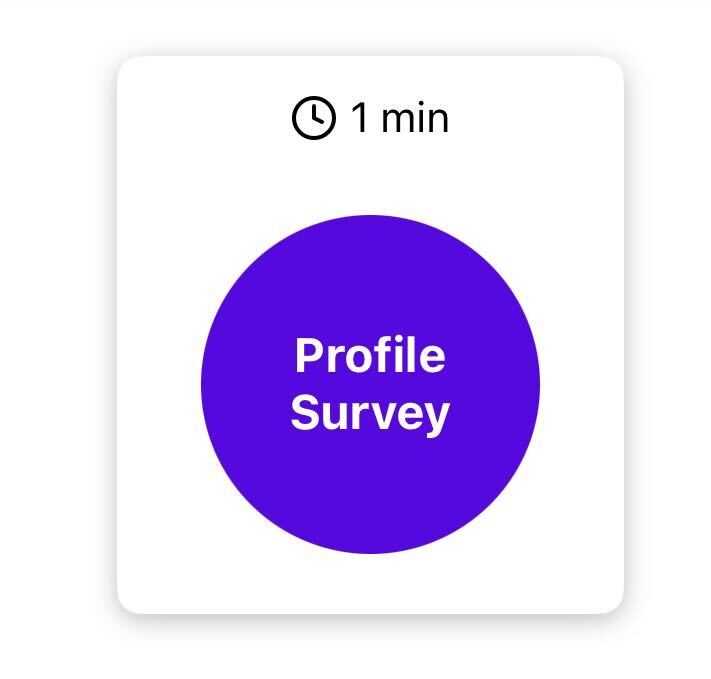
1. The profile survey
New users must complete the introductory profile survey before they can access other surveys. For these new users, the SDK will return only this survey until they have completed it.
- Only shown to users that are new to TapResearch
- Will always be returned by itself, with a survey identifier of
profile - Display example:
2. Survey details
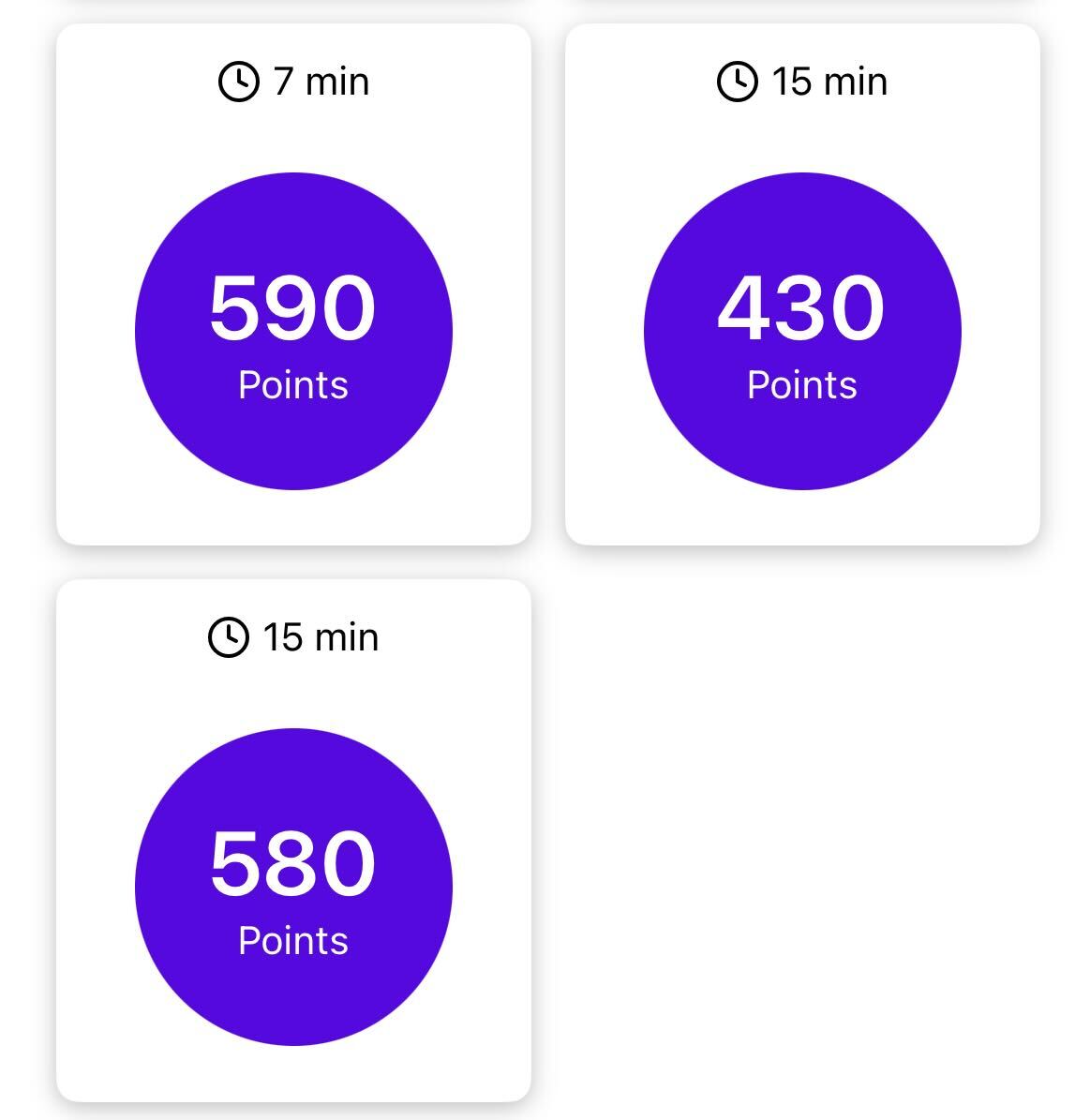
After completing the profile survey, users should then start receiving real surveys. Surveys will have the following attributes:
class TRSurvey {
  // Primary attributes
  final String? surveyId;            // Unique identifier, will be used when a user taps on a survey
  final int? lengthInMinutes;        // The estimated time to complete the survey
  final double? rewardAmount;        // The reward amount for taking the survey
  final String? currencyName;        // The name of the reward currency
  final bool? isHotTile;             // Whether the survey should be designated as a "hot tile"
  final String? category;            // The survey's category, if it has one

  // Sale attributes
  final bool? isSale;                // Whether a currency sale is currently active
  final String? saleEndDate;         // If a sale is active, the UTC date it will end
  final double? saleMultiplier;      // The multiplier being applied to the sale
  final double? preSaleRewardAmount; // The pre-multiplier reward amount, for enhancing UI during a sale
}
- We recommend displaying all primary data points to allow users to choose which survey length/reward they want
- Display example:
3. "Hot" tiles
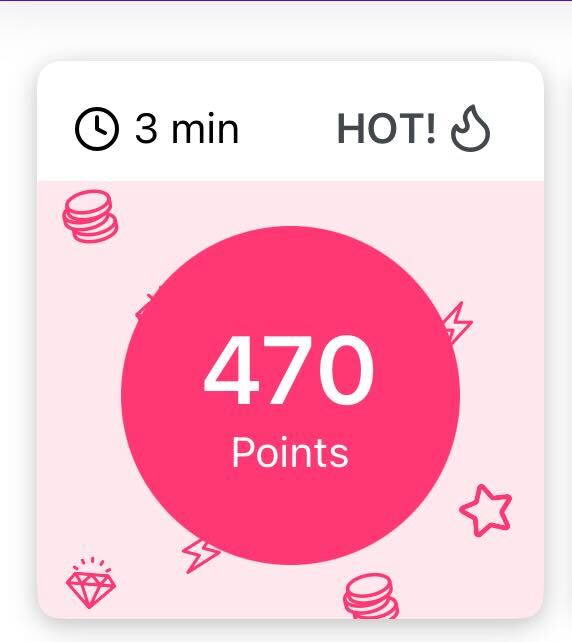
Hot tiles are surveys with exceptional scores, typically offering the best time-to-reward ratio. Displaying a special UI highlight for these surveys is recommended, as they tend to increase user engagement and click-through rates.
- Display example:
4. Currency Sales
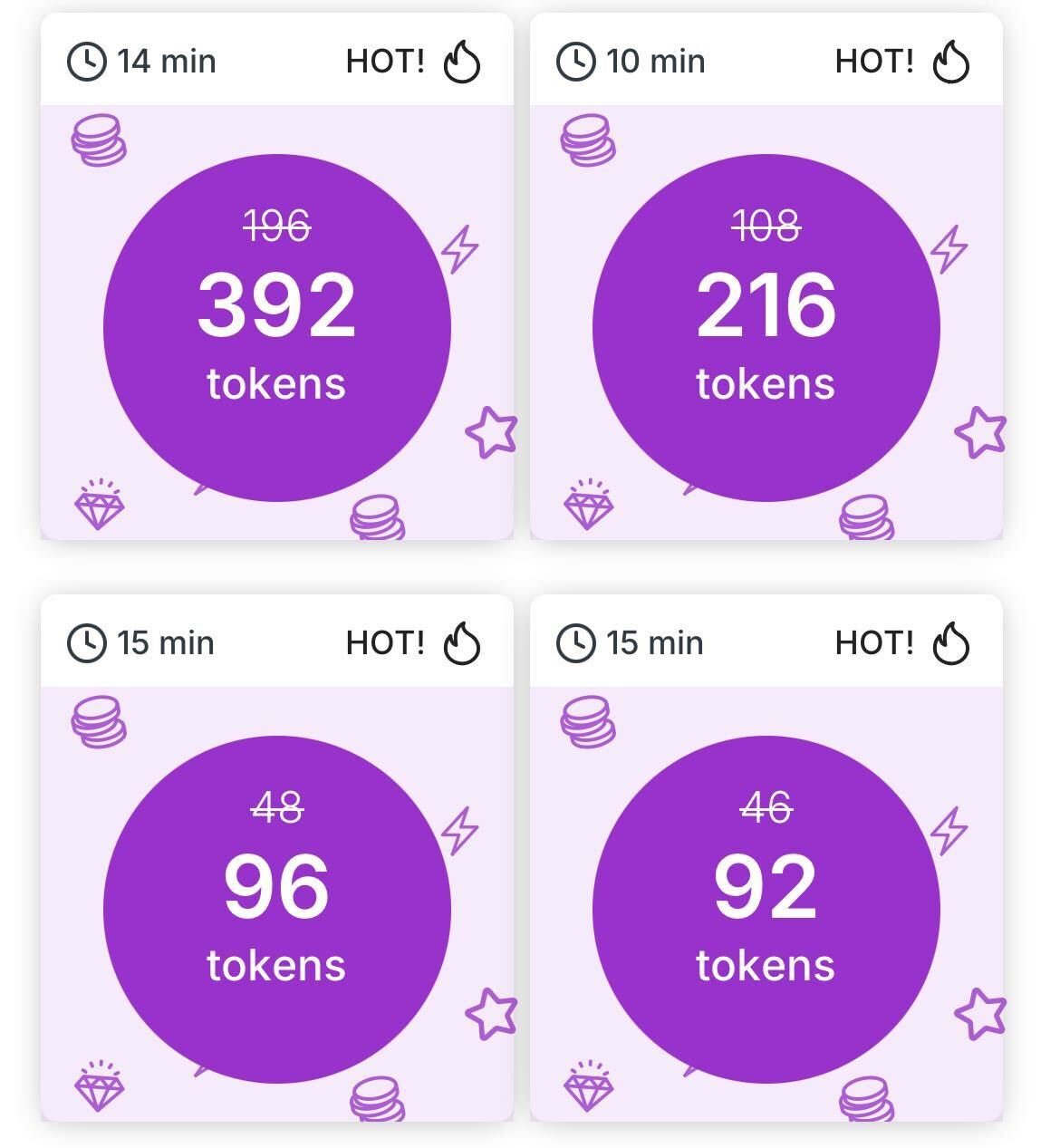
When running promotional currency sales, the relevant sale attributes of the survey object will populate, allowing you to show enhanced UIs and CTAs to users. We recommend using this data to display the extra rewards boost on the individual tiles.
- Display example:
Integration
The code below demonstrates how to:
- Fetch surveys after SDK initialization
- Set up a surveys refreshed listener (required)
Key points:
- Fetch surveys only after the SDK Ready event
- Render the
TRSurveyobjects in your UI (seeSurveyWallPreviewScreenin the Sample App) - Required: Set the surveys refreshed listener to get updates when surveys change
Attempting to fetch surveys before SDK Ready will result in an error and no surveys will be returned.
Initialization
Initialize the TapResearch SDK as early as possible. It is required to use different API tokens for iOS and Android.
The user identifier passed through initialization must be unique per user! Only initialize once you are able to provide a unique identifier. Re-using the same user identifier is not supported and will prevent your users from accessing our service.
The callback classes and onError (a TRErrorCallback) are defined in Callbacks.
import 'dart:io';

import 'package:tapresearch_flutter_plugin/tapresearch_flutter_plugin.dart';

final _plugin = TapresearchFlutterPlugin();

void initTapResearch() {
  final String apiToken = Platform.isAndroid ? "YOUR_ANDROID_API_TOKEN" : "YOUR_IOS_API_TOKEN";
  final String userIdentifier = "YOUR_UNIQUE_USER_ID";

  _plugin.initialize(
    apiToken: apiToken,
    userIdentifier: userIdentifier,
    sdkReadyCallback: MySdkReadyCallback(),
    errorCallback: onError,
    rewardCallback: MyRewardCallback(),
  );
}
Set the surveys refreshed listener
Implement TRSurveysRefreshedListener to be notified when surveys are refreshed and available for a placement.
When surveys are refreshed, we recommend calling getSurveysForPlacement() so you can re-render your
custom UI, as survey tile values may have changed. It could also be a good time to call getPlacementDetails()
because the placementDetails.contentType may have changed. Possible values could be profiler or
survey_wall_preview or another string value.
class MySurveysRefreshedListener implements TRSurveysRefreshedListener {
void onSurveysRefreshedForPlacement(String placementTag) {
print("Surveys refreshed for $placementTag");
/* This is a good time to call getSurveysForPlacement() to re-render your SWP screen
and / or
getPlacementDetails() where the returned placementDetails.contentType
can be 'profiler' or 'survey_wall_preview' or another string value
*/
}
}
Provide the listener to the SDK:
_plugin.setSurveysRefreshedListener(MySurveysRefreshedListener());
Has surveys for placement
Use hasSurveysForPlacement() to check whether a placement has surveys available.
void checkForSurveys(String placementTag) async {
  bool hasSurveys = await _plugin.hasSurveysForPlacement(placementTag, onError);
  print("Has surveys: $hasSurveys");
}
Get surveys for placement
Use getSurveysForPlacement() to fetch the list of available surveys for a placement tag.
void fetchSurveys(String placementTag) async {
  List<TRSurvey>? surveys = await _plugin.getSurveysForPlacement(placementTag, onError);

  if (surveys != null && surveys.isNotEmpty) {
    for (var survey in surveys) {
      print("Available Survey: ${survey.surveyId} - Reward: ${survey.rewardAmount}");
    }
  }
}
Show survey
When a user selects a survey from your custom UI, use showSurveyForPlacement() to open it. You can also pass customParameters, as with showContentForPlacement().
void openSurvey(String placementTag, String surveyId) {
  _plugin.showSurveyForPlacement(
    placementTag: placementTag,
    surveyId: surveyId,
    contentCallback: MyContentCallback(),
    errorCallback: onError,
  );
}
TRSurvey class
| Property | Type | Description |
|---|---|---|
surveyId | String? | Unique identifier for the survey; pass it to showSurveyForPlacement(). |
lengthInMinutes | int? | Estimated time to complete in minutes. |
rewardAmount | double? | The reward amount for completion. |
currencyName | String? | The name of the currency. |
isSale | bool? | Indicates if a sale is active for this survey. |
saleEndDate | String? | If a sale is active, the UTC date it ends. |
saleMultiplier | double? | The multiplier applied during the sale. |
preSaleRewardAmount | double? | The reward amount before the sale multiplier. |
isHotTile | bool? | Indicates if this is a high-priority survey. |
category | String? | The survey's category. |
Getting placement details
Placement details can change as our SDK refreshes placements in the background, so it is not recommended to store or cache these values. Instead, refetch the details each time you need to use them, e.g. to display something in your UI.
Get placement details by calling getPlacementDetails(placementTag, errorListener: ...).
void getPlacementInfo(String placementTag) async {
  TRPlacementDetails? details = await _plugin.getPlacementDetails(
    placementTag,
    errorListener: onError,
  );

  if (details != null) {
    print("Placement Name: ${details.name}");
    print("Is Sale Active: ${details.isSale}");
  }
}
See Set the Surveys Refreshed Listener
Example Survey Wall Preview screen with custom tiles can be seen at (SurveyWallPreviewScreen class): https://github.com/TapResearch/tapresearch_flutter_plugin/blob/master/example/lib/main.dart
TRPlacementDetails class
TRPlacementDetails contains the following properties:
| Property | Type | Description |
|---|---|---|
name | String? | The name of the placement. |
contentType | String? | The type of content associated with the placement. |
currencyName | String? | The name of the currency rewarded by this placement. |
isSale | bool? | Indicates if there is an active sale. |
saleType | String? | The category or type of the active sale. |
saleEndDate | String? | When the sale expires (UTC date string). |
saleMultiplier | double? | The reward multiplier during a sale. |
saleDisplayName | String? | The display name for the sale. |
saleTag | String? | A tag associated with the sale. |
bonusBarProgress | TRBonusBarProgress? | The user's progress toward a bonus. |
TRBonusBarProgress class
| Property | Type | Description |
|---|---|---|
isActive | bool? | Indicates if the bonus bar is currently active. |
currentCompletes | int? | The number of survey completions achieved toward the bonus. |
bonusWindowEndAt | String? | When the bonus window expires (UTC date string). |
bonusTiers | List<TRBonusTier>? | A list of tiers available in the progress bar. |
error | TRError? | Error information if the progress could not be retrieved. |
TRBonusTier class
| Property | Type | Description |
|---|---|---|
tierNumber | int? | The sequence number of the tier. |
completesNeeded | int? | Number of completions required to reach this tier. |
rewardAmount | double? | The reward granted upon completing this tier. |
status | String? | The current status of the tier. |