Handling rewards
Overview
There are two ways to receive rewards (choose one per app):
- In-app callbacks - Default method
- Server-to-server postbacks - Requires a postback URL. Setting one switches the app from in-app callbacks to postbacks.
Reward flow
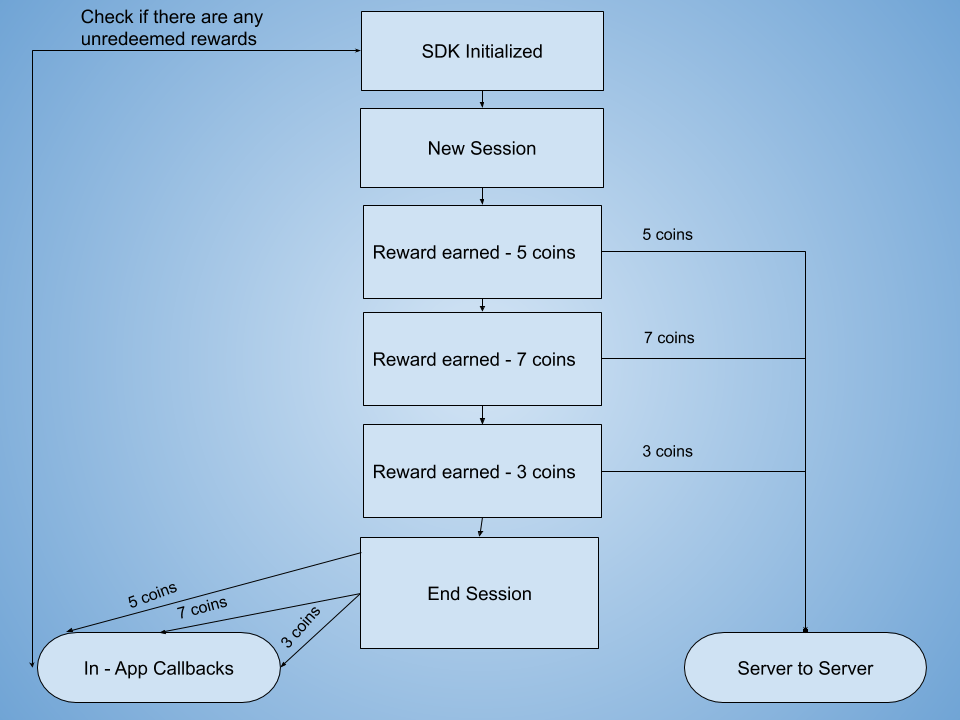
In-app callbacks
In-app callbacks deliver a list of rewards through your SDK's reward callback.
Example: If a user completes three surveys, the SDK fires one callback containing all three rewards.
Key features:
- TapResearch notifies users of their rewards
- Default reward method: used unless you set a postback URL
When callbacks fire:
- When the user closes TapResearch
- After successful SDK initialization, to deliver unredeemed rewards
Setting a postback URL switches the app from in-app callbacks to server-to-server postbacks.
Server-to-server postbacks
The server-to-server postback is a GET request that TapResearch sends to your postback URL as soon as a user earns a reward. The reward details are passed as query parameters, and an HMAC-MD5 signature (sig) lets you verify the request came from TapResearch.
Important: With server-to-server postbacks your app is responsible for notifying users of the rewards they receive — TapResearch does not notify users with this method.
Set your postback URL
In the Publisher Dashboard, open your app's Settings tab and select iOS settings or Android settings. Enter your URL in Rewards/monetization postback URL under Server-to-server postbacks.
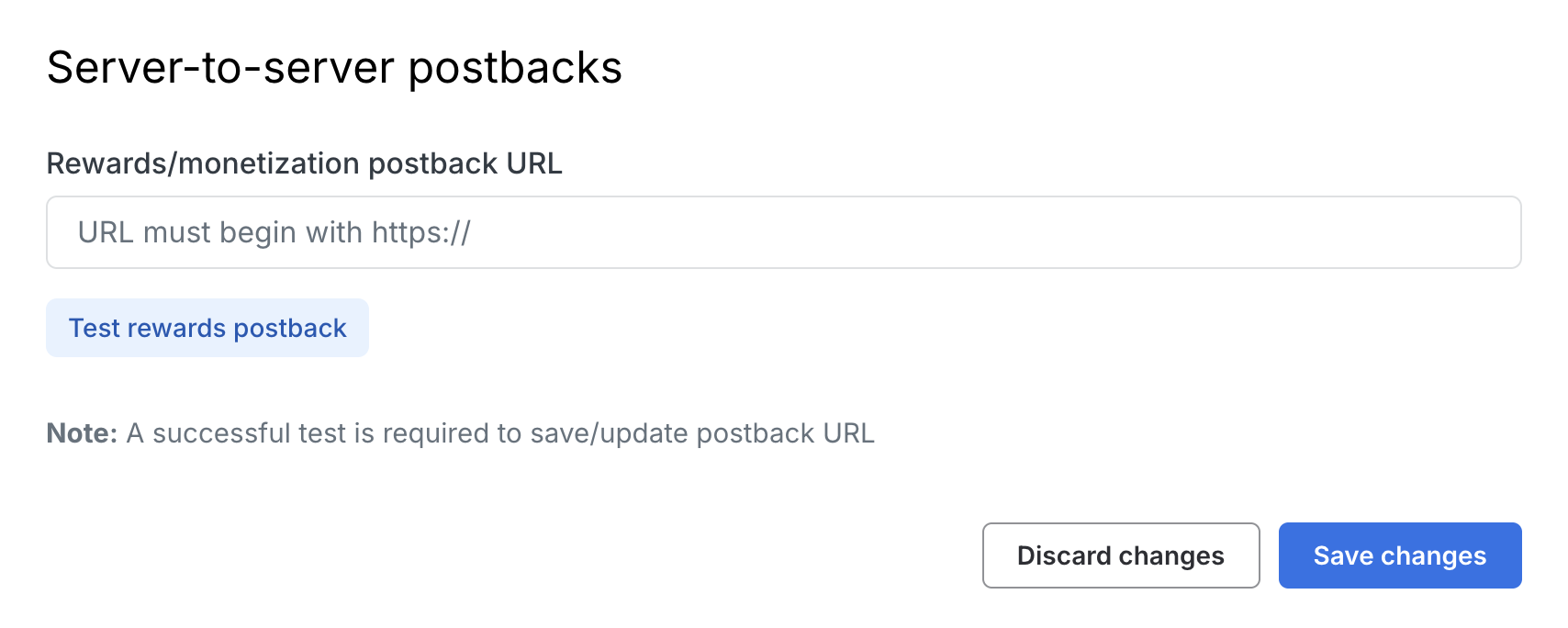
URL requirements:
- Must begin with
https:// - No spaces or special characters, other than the placeholders described in Renaming parameters
- Must respond within 5 seconds. The dashboard test requires HTTP
200; live postbacks accept any2xxresponse.
Testing your postback URL
Run Test rewards postback before saving or updating the URL. The test must return HTTP 200 before the dashboard allows you to save.
Sample requests
https://your-postback-url.example.com/postback?api_token=your-api-token&cpid=tap_37939e4ede350f3a8d5149d2fcaa025e&ip_address=203.0.113.42&offer_identifier=8f14e45fceea167a5a36dedd4bea2543&payout_amount=191&payout_currency=gold&payout_type=3&revenue=0.5&tid=777ca23551a4a9173920c22e1ed7f4f3&uid=developers%40tapresearch.com&sig=435ad87fb971836540ebc3a320efe9f1
POST requests
To receive postbacks as POST requests, contact developers@tapresearch.com. The fields are sent in a JSON body, with sech instead of sig for signature validation.
{
  "tid": "777ca23551a4a9173920c22e1ed7f4f3",
  "api_token": "your-api-token",
  "cpid": "tap_37939e4ede350f3a8d5149d2fcaa025e",
  "revenue": "0.5",
  "payout_amount": 191,
  "payout_currency": "gold",
  "uid": "developers@tapresearch.com",
  "did": "0258DE71-DFEB-4399-BF26-11C1F6E600D2",
  "payout_type": 3,
  "offer_identifier": "8f14e45fceea167a5a36dedd4bea2543",
  "ip_address": "203.0.113.42",
  "sech": "7cf1c6a66c67c596280437985a76ccea4d78705116b9473be79acf640596a630"
}
Parameters
| Parameter | Type | Description |
|---|---|---|
| api_token | String | Your app's API token. |
| cpid | String | Unique identifier for the reward. Use it to ensure each reward is credited only once. |
| did | String | Device identifier, if available. |
| ip_address | String | The user's IP address, if available. |
| offer_identifier | String | Identifier of the TapResearch offer that issued the reward. |
| payout_amount | Integer | Amount of currency earned by this user. |
| payout_currency | String | The name of the currency the user earned. |
| payout_type | Integer | The action that the user was rewarded for. 0 - Profile Complete, 3 - Survey Rewarded, 9 - Quick Question Completed (SDK only), 10 - Bonus Bar Reward. |
| revenue | Decimal | Amount you will be paid for this reward, in USD. |
| tid | String | Transaction ID (click ID) of the user's session. Use cpid, not tid, to identify a reward. |
| uid | String | Persistent unique identifier for this user. |
| sig | String | GET requests only, always the last parameter: an HMAC-MD5 of the query string before it. See Signature validation. |
Postbacks may include additional fields. Validate the signature against the entire query string you receive, not a fixed list of fields.
Renaming parameters
If your postback URL points at a tracking or affiliate network that expects its own parameter names, put placeholders in the URL's query string. TapResearch fills each placeholder with the matching value and sends that value only under your parameter name.
| Placeholder | Filled with |
|---|---|
{UID} | uid |
{DID} | did |
{TID} | tid |
{CPID} | cpid |
{API_TOKEN} | api_token |
{PAYOUT_AMOUNT} | payout_amount |
{PAYOUT_CURRENCY} | payout_currency |
{REVENUE} | revenue |
{PAYOUT_TYPE} | payout_type |
{IP_ADDRESS} | ip_address |
Postback URL you save:
https://your-postback-url.example.com/postback?clickid={TID}&sum={REVENUE}&goal={PAYOUT_TYPE}&custom_field2={PAYOUT_AMOUNT}
Request you receive:
https://your-postback-url.example.com/postback?clickid=777ca23551a4a9173920c22e1ed7f4f3&sum=0.5&goal=3&custom_field2=191&api_token=your-api-token&cpid=tap_37939e4ede350f3a8d5149d2fcaa025e&ip_address=203.0.113.42&offer_identifier=8f14e45fceea167a5a36dedd4bea2543&payout_currency=gold&uid=developers%40tapresearch.com&sig=a86c2ce25c178aa375b82e0d3b51e93a
How placeholders work:
- Placeholders are case-sensitive and go in parameter values.
- Parameters you don't rename are still sent under their standard names.
- Parameters with unknown placeholders, literal braces, or unavailable values are omitted.
- Placeholders apply to
GETpostbacks only.
sig remains the last parameter and covers the entire query string. Don't name a custom parameter sig. See Signature validation.
Use Test rewards postback to try a URL with placeholders before you save it.
Security
GET postbacks are signed with sig, as described below.
Signature validation
Every GET postback ends with a sig parameter: an HMAC-MD5 of the query string that comes before it. Validate it on every request before you reward a user.
Sign the entire query string exactly as you receive it, minus sig — don't rebuild it from a fixed list of parameters. The signature covers every parameter present, including your own static and renamed parameters, so hashing whatever arrives (as the steps and code below do) stays correct as parameters are added.
Use your app's API Secret, available in its settings in the Publisher Dashboard. The examples use the sample secret 26dcc0fc7b6208fdfeffaf19f627cb4a.
-
Start with the incoming postback request, for example:
https://your-postback-url.example.com/postback?api_token=your-api-token&cpid=tap_37939e4ede350f3a8d5149d2fcaa025e&ip_address=203.0.113.42&offer_identifier=8f14e45fceea167a5a36dedd4bea2543&payout_amount=191&payout_currency=gold&payout_type=3&revenue=0.5&tid=777ca23551a4a9173920c22e1ed7f4f3&uid=developers%40tapresearch.com&sig=435ad87fb971836540ebc3a320efe9f1 -
Isolate the query string: everything after the
?. -
Remove
&sig=and the signature after it.sigis always the last parameter. -
Percent-decode the rest, preserving literal
+characters. The examples below use decoders that do this. -
Run your API secret and the decoded query string through an HMAC-MD5 generator, with lowercase hex output.
-
Compare your result with the
sigvalue, using a constant-time comparison. If they match, record the reward and credit the user.
- Ruby
- PHP
- Java
require "openssl"
require "uri"

# Sample request URL (in Rails, read the raw query with request.query_string)
url = "https://your-postback-url.example.com/postback?api_token=your-api-token&cpid=tap_37939e4ede350f3a8d5149d2fcaa025e&ip_address=203.0.113.42&offer_identifier=8f14e45fceea167a5a36dedd4bea2543&payout_amount=191&payout_currency=gold&payout_type=3&revenue=0.5&tid=777ca23551a4a9173920c22e1ed7f4f3&uid=developers%40tapresearch.com&sig=435ad87fb971836540ebc3a320efe9f1"

# Isolate the query string and split off sig, which is always last
query_string = url.split("?", 2).last
signature = query_string[/&sig=([0-9a-f]+)\z/, 1]
unsigned_query = query_string.sub(/&sig=[0-9a-f]+\z/, "")

# Percent-decode only: "+" stays "+"
decoded = URI::Parser.new.unescape(unsigned_query)

# Generate HMAC-MD5
api_secret = "26dcc0fc7b6208fdfeffaf19f627cb4a"
expected = OpenSSL::HMAC.hexdigest("MD5", api_secret, decoded)

puts OpenSSL.secure_compare(expected, signature) # true
<?php
# Sample request URL (in production, read the raw query from $_SERVER['QUERY_STRING'])
$url = 'https://your-postback-url.example.com/postback?api_token=your-api-token&cpid=tap_37939e4ede350f3a8d5149d2fcaa025e&ip_address=203.0.113.42&offer_identifier=8f14e45fceea167a5a36dedd4bea2543&payout_amount=191&payout_currency=gold&payout_type=3&revenue=0.5&tid=777ca23551a4a9173920c22e1ed7f4f3&uid=developers%40tapresearch.com&sig=435ad87fb971836540ebc3a320efe9f1';

# Isolate the query string and split off sig, which is always last
$query_string = parse_url($url, PHP_URL_QUERY);
$sig_position = strrpos($query_string, '&sig=');
$signature = substr($query_string, $sig_position + strlen('&sig='));
$unsigned_query = substr($query_string, 0, $sig_position);

# Percent-decode only: rawurldecode keeps "+" as "+"
$decoded = rawurldecode($unsigned_query);

# Generate HMAC-MD5
$api_secret = '26dcc0fc7b6208fdfeffaf19f627cb4a';
$expected = hash_hmac('md5', $decoded, $api_secret);

var_dump(hash_equals($expected, $signature)); # bool(true)

?>
private static final String API_SECRET = "26dcc0fc7b6208fdfeffaf19f627cb4a";
private static final String ALGO = "HmacMD5";

try {
    // Sample request URL (in a servlet, read the raw query with request.getQueryString())
    String urlString = "https://your-postback-url.example.com/postback?api_token=your-api-token&cpid=tap_37939e4ede350f3a8d5149d2fcaa025e&ip_address=203.0.113.42&offer_identifier=8f14e45fceea167a5a36dedd4bea2543&payout_amount=191&payout_currency=gold&payout_type=3&revenue=0.5&tid=777ca23551a4a9173920c22e1ed7f4f3&uid=developers%40tapresearch.com&sig=435ad87fb971836540ebc3a320efe9f1";

    // Isolate the query string and split off sig, which is always last
    String queryString = urlString.substring(urlString.indexOf('?') + 1);
    int sigIndex = queryString.lastIndexOf("&sig=");
    String signature = queryString.substring(sigIndex + "&sig=".length());
    String unsignedQuery = queryString.substring(0, sigIndex);

    // Percent-decode only: protect "+" so URLDecoder doesn't turn it into a space
    String decoded = URLDecoder.decode(unsignedQuery.replace("+", "%2B"), StandardCharsets.UTF_8);

    // Generate HMAC-MD5
    Mac mac = Mac.getInstance(ALGO);
    mac.init(new SecretKeySpec(API_SECRET.getBytes(StandardCharsets.UTF_8), ALGO));
    byte[] bytes = mac.doFinal(decoded.getBytes(StandardCharsets.UTF_8));

    StringBuilder expected = new StringBuilder();
    for (byte b : bytes) {
        expected.append(String.format("%02x", b));
    }
    System.out.println(MessageDigest.isEqual(
        expected.toString().getBytes(StandardCharsets.UTF_8),
        signature.getBytes(StandardCharsets.UTF_8))); // true
} catch (Exception e) {
    e.printStackTrace();
}
IP allowlist
To further harden your endpoint, you can restrict incoming postback requests to the following TapResearch source IP addresses:
| IP Address |
|---|
| 34.198.225.203 |
| 3.88.121.21 |
| 3.89.214.250 |
| 3.92.129.242 |
Retries
If a postback fails, our system retries sending the reward for 48 hours OR until a 2xx response code is received.