Handling Quick Question responses
Overview
There are several ways to ingest Quick Question responses:
- In-app callback - Real-time responses within your app
- Server-to-server postback - Automated server notifications
- CSV download - Manual export from the dashboard
- API download - Programmatic data retrieval
Select an approach based on how you plan to use the Quick Question response data.
In-app callback
In-app callbacks are fired whenever a user completes a Quick Question. Use this method when you need real-time access to response data.
The Quick Question callback is registered differently on each platform. See the platform-specific documentation below for implementation details:
- iOS Quick Question response
- Android Quick Question response
- Unity Quick Question response
- React Native Quick Question response
- Flutter Quick Question response
Server-to-server postback
Server-to-server postbacks are sent after a user answers a Quick Question, if a postback URL is configured in your app settings. Note: Setting up a postback URL does not prevent in-app callbacks from firing—both can be used simultaneously.
Setup instructions
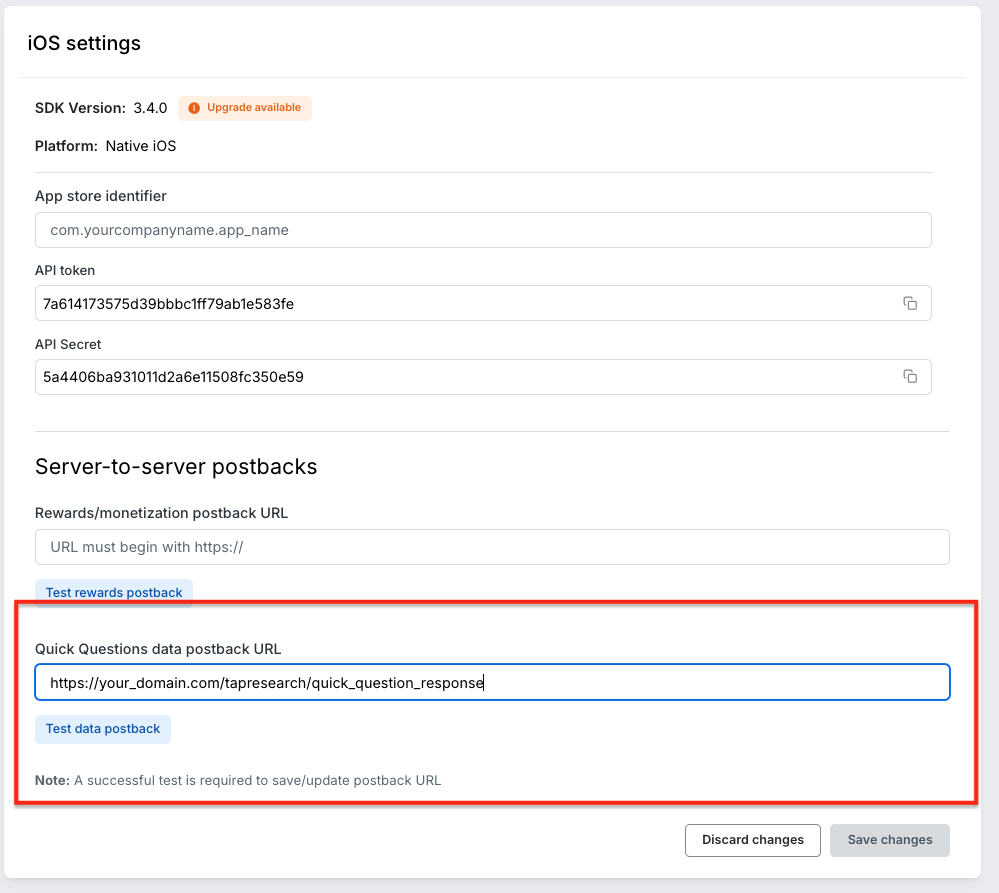
- In the Publisher Dashboard, open your app title and click Settings
- Select the platform (iOS and Android are configured separately)
- Add your Quick Question postback endpoint to "Quick Questions data postback URL"
- Click "Test data postback" to verify the endpoint
- Click "Save changes"
Important: You must receive a 200 response from the test postback to save the URL.
Request format
Quick Question postbacks use GET requests with URL-encoded, nested query parameters and a sig signature. Validate them as described in Handling rewards.
Example payload
The following JSON illustrates the payload fields before query-string encoding:
{
  "survey_identifier": "YOUR_SURVEY_IDENTIFIER",
  "app_name": "YOUR_APP_NAME",
  "api_token": "YOUR_API_TOKEN",
  "sdk_version": "3.5.3",
  "platform": "Android",
  "placement_tag": "YOUR_PLACEMENT_TAG",
  "user_identifier": "YOUR_USER_IDENTIFIER",
  "user_locale": "en",
  "seen_at": "2025-10-13T22:31:12.455Z",
  "complete": {
    "complete_identifier": "tap_qq_68_fb67345f15e08892a0635b7ddcac3138",
    "completed_at": "2025-10-13T22:31:24.869Z"
  },
  "questions": [
    {
      "question_identifier": "50e2ed203cd2b810ba982b7ce9841939",
      "question_text": "This is the question",
      "question_type": "multiple_choice__single",
      "user_answer": {
        "value": "Answer F",
        "identifiers": [
          "78bf19eaad5a8bef5c804db7f8760f58"
        ]
      }
    },
    {
      "question_identifier": "e2b3f38f2c5f423ed8303bd68dc2dc77",
      "question_text": "Test",
      "question_type": "open_text",
      "user_answer": {
        "identifiers": [],
        "value": "My answer"
      }
    }
  ],
  "target_audience": [
    {
      "filter_attribute_name": "some_attribute_name",
      "filter_operator": "equals",
      "filter_value": "SomeValue",
      "user_value": "SomeValue"
    }
  ]
}
CSV download
CSV download is available for any Quick Question through the publisher dashboard.
To download:
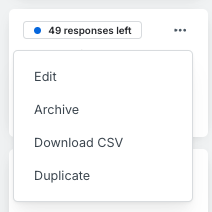
- Click the "..." dropdown in the top right corner of your Quick Question content card
- Select "Download CSV"
The CSV file contains all current responses and is updated in real-time.
API download
API download is available for all Quick Questions. This method is ideal when:
- Quick Question data is not needed immediately
- You want to pull all response data on a scheduled basis
- You're ingesting data into your own data warehouse
Note: This data is updated on a daily basis.
Getting started
See the Reporting API Documentation for implementation details.
To get access to the stats API, contact our account management team at developers@tapresearch.com.